Task guide / PC Early Access · November 2026
How to start grooming and check overnight results
Place a Snowcat Shed, assign groomers to it, and make sure the intended trail is marked for grooming. Let the night run, then compare shed progress with the actual trail’s snow condition the next morning. A shed without assigned crew is not a working grooming service, and every guest does not want every run groomed.
Updated 2026-11-13 · PC Early Access · November 2026
Follow these steps
Choose which trails to groom
Select a run and inspect its Edit controls. Enable grooming for the runs you intend to maintain. Keep guest demand in view: in Part 2, the author switches one red run to ungroomed after complaints that no ungroomed terrain is available. Plan a mix your connected terrain can support rather than applying one setting to every run.
Build the shed, hire and assign the crew
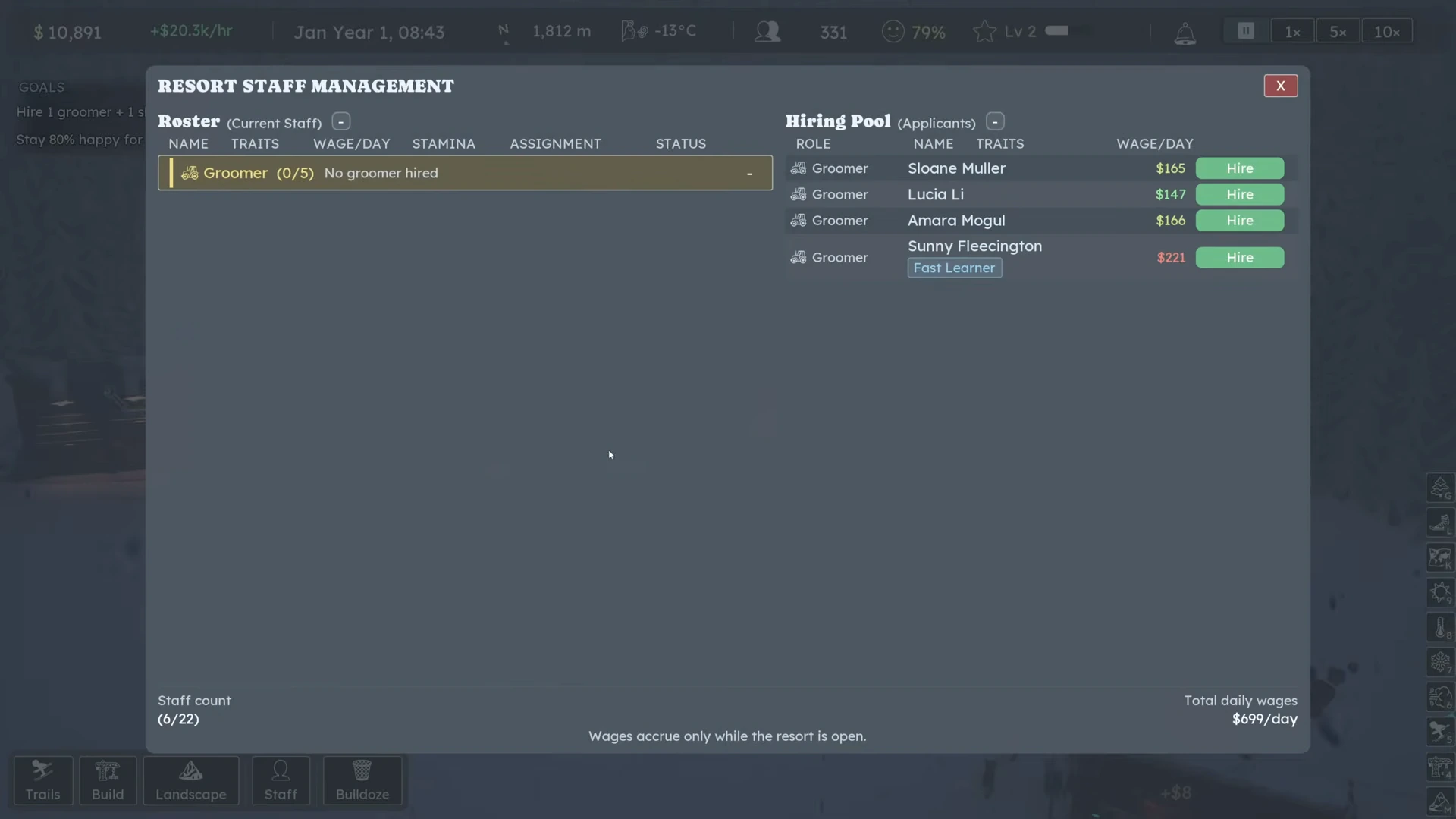
Open Build and place Snowcat Shed in a reachable part of the operating resort. Open Staff and hire a groomer from the available candidates. The public starting example places a shed near maintenance and then assigns groomers. Open the shed or Staff assignment controls and verify the crew belongs to this workplace. Read the actual equipment and capacity shown in your panel before buying more.
 Open full-size image ↗
No groomer is hired yet: Groomer (0/5). Click Hire beside a candidate, then Assign them to the shed. Nivarias Part 1, 29:06; exact build not shown. Let the overnight work happen
Advance through closing time into the night. Observe whether snowcats leave and work the chosen runs, and read the shed’s progress. In the public example, two groomers work at night, but the author notes they cannot finish all of his existing terrain. That sample does not establish a fixed trails-per-groomer rule.
Inspect the snow the next morning
Open the snow view and check the selected trail’s actual surface. Compare the result with the work the shed reports, including unfinished sections. Groomed snow can show corduroy; the snow readout matters more than seeing a vehicle nearby. Keep any remaining packed/ungroomed sections separate from runs you deliberately left ungroomed.
Reduce the unknown before buying more
If the night was not enough, recheck the run’s grooming setting, assigned crew and actual work path. Compare one selected run across a full night before committing to a larger fleet. Expansion and promotion decisions should follow visible unfinished work and your budget, not an assumed universal throughput.
What success looks like
Assigned groomers leave the shed overnight and work the intended run; the following morning’s snow view shows which sections were groomed and which remain unfinished. Deliberately ungroomed runs remain available for that demand.
If it does not work
Launch-week players report partial coverage, daytime overruns and shed counts that do not match the snow view. Those reports do not establish a guaranteed repair. If settings and assignment are correct but the mismatch persists, save the game and record the build, chosen run, shed count and morning snow condition for a report. CL7671 fixes duplicate dispatch after a pre-opening reload; it does not prove every coverage/pathing complaint is fixed.
Sources and version notes
- Nivarias Part 1: build shed, assign groomers and observe night work ↗
Sponsored public full-game footage; exact build not shown. Not our own playtest.
- Nivarias Part 2: preserve an ungroomed run ↗
Sponsored public full-game footage; exact build not shown. Not our own playtest.
- Steam community: grooming coverage and snow-condition mismatch ↗
- Official CL6444 patch notes ↗
- Official CL7671 patch notes ↗