Task guide / PC Early Access · November 2026
How to set up snowmaking and check idle snow guns
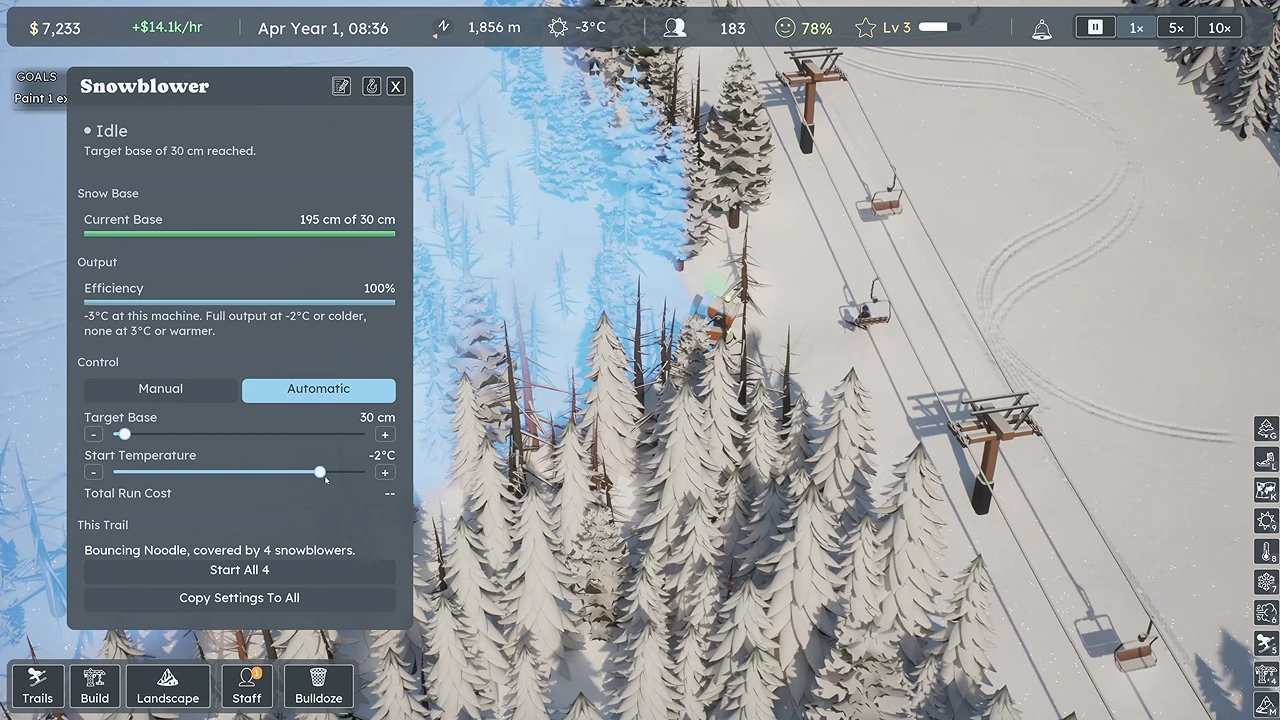
Cover the run with snowblowers, then select a machine and set Automatic, Target Base and Start Temperature. An idle gun is not automatically broken: first compare the snow already on the trail with its target, then check the temperature and coverage. In the launch-week example below, 195 cm of snow already exceeds the 30 cm target, so Idle is expected.
Updated 2026-11-13 · PC Early Access · November 2026
Follow these steps
Choose a run you can afford to keep open
Start with a connected run served by an operating lift. Select Snowblower in the build menu and read its purchase price, hourly output and running cost before placing it. Cover one useful lift-to-base route first; a scattered group of guns is less useful if bare sections still break the descent. Leave cash for the upcoming bill instead of spending the full balance on equipment.
Use the placement radius to cover the actual snow surface
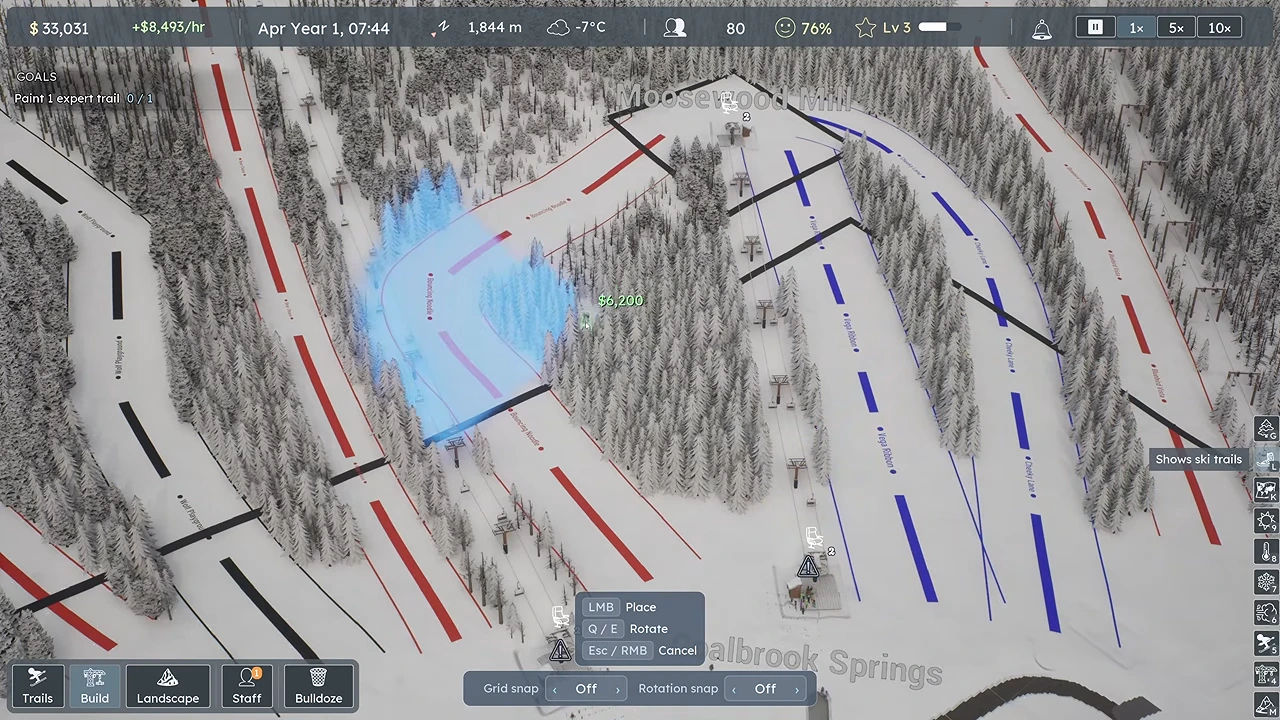
Move the placement preview along the run and use its radius to check which sections are reached. Continue down to the lower part of the trail, rather than stopping at the lift's top station. Where two runs sit close together, check the preview before assuming one machine covers both. Coverage marks appear while placing a snowblower.
 Open full-size image ↗
Use the placement radius along the route. Nivarias, Part 2, 11:33; launch-week full-game footage, exact build not shown. Set Automatic, Target Base and Start Temperature
Select a placed snowblower. Choose Automatic, set Target Base to the snow depth you want it to maintain, and set Start Temperature for when it may start. The example uses 30 cm and initially −2°C; these are example settings, not an optimum for every mountain. Use Copy Settings To All only after checking that the other machines should use the same values.
 Open full-size image ↗
195 cm is already above the 30 cm target. This Idle state does not show a failure. Nivarias, Part 2, 12:21; exact build not shown. Read Idle in the context of depth and temperature
Check the live readouts before changing settings or buying more guns. In the shown machine's tooltip, output is full at −2°C or colder and falls to none at 3°C or warmer. Raising Start Temperature changes the automatic trigger; it does not make warm air produce snow at full output. The author later changes the trigger to 0°C, which is not proof that snowmaking works normally at every warmer temperature.
What to check before calling an idle gun broken What you see Next check Action Depth is at or above Target Base Compare the actual and target depths Leave Automatic set and watch after the snow falls below your target. Depth is below target Check Start Temperature and the output tooltip Wait for a suitable temperature; a higher trigger does not remove the machine's temperature limit. Only part of a run lacks snow Inspect the placement coverage along that section Reposition or add coverage for the gap rather than changing every machine. Settings look right but no output after a month or season changes Check a single machine and its manual controls Save first; see the reported seasonal issue below before buying replacement guns. Watch the next suitable cold period
Advance time and inspect the chosen run when it is below target and cold enough for your settings. Look for the machines working and the snow-depth readout increasing, then confirm that the run remains usable. The Part 2 continuation shows snowmaking again in the following October; that public gameplay example does not guarantee that every save is free of seasonal problems.
What success looks like
The intended descent has coverage, the machines retain your automatic settings, and snow depth increases when the run is below target during suitable temperatures. If the snow is already above target, a machine staying idle can be the correct result.
If it does not work
If the target, temperature and coverage all explain the state, correct that specific condition first. A launch-week Steam report describes snow guns stopping after a month or season change, even in manual mode; its author says restarting the game restored them only until the next change. Save before trying a restart and recheck one gun afterward. This is a reported workaround, not a verified permanent fix. If it persists, keep the save, game build and settings for a bug report rather than spending more on identical guns.
Sources and version notes
- Nivarias Part 2: placement and automatic settings, 11:05–12:38 ↗
Sponsored public full-game footage; exact build not shown. Not our own playtest.
- Official CL6750: hourly snowmaking cost/output and night operation ↗
- Official CL6582: placement-only coverage marks ↗
- Steam community: snow guns stopping after season changes ↗
Community report and temporary restart workaround; not a confirmed fix.