Task guide / PC Early Access · November 2026
How to shorten lift queues and diagnose grey upgrades
Inspect the busiest lift’s capacity and efficiency, then check staffing and Operations speed. For a grey upgrade, check both the unlocked lift types and the station-space warning; cash alone is not enough. A longer queue organizes waiting guests, while higher throughput or lower demand addresses the bottleneck.
Updated 2026-11-13 · PC Early Access · November 2026
Follow these steps
Read the bottleneck at the busiest station
Select the lift and compare the queue, capacity per hour and average seats filled. Official notes say the lift panel exposes these throughput readouts. An empty chair leaving a long queue points you toward loading efficiency; a fully used small lift may need more physical capacity. Inspect the lift feeding the busiest hub, not only whichever queue is easiest to see.
Use a reachable queue and keep the exit clear
Draw a lift queue from the station with a clear entrance and space around neighboring facilities. A community reply describes limiting waiting to a placed queue’s size. This can contain crowd spillover but does not add seats per hour. If Guests Can’t Board appears, fix the queue connection before making it longer.
Check lifties and Operations speed
Look at efficiency on the lift’s first tab, then add a lifty only if the extra wage is justified by the loading improvement. Check the speed control under Operations and compare the capacity/dispatch readout after changing it. Follow the game’s available settings; do not assume extra staff or a higher speed will remove every queue. Promotion traits can also improve loading and dispatch.
Diagnose a grey upgrade in the right order
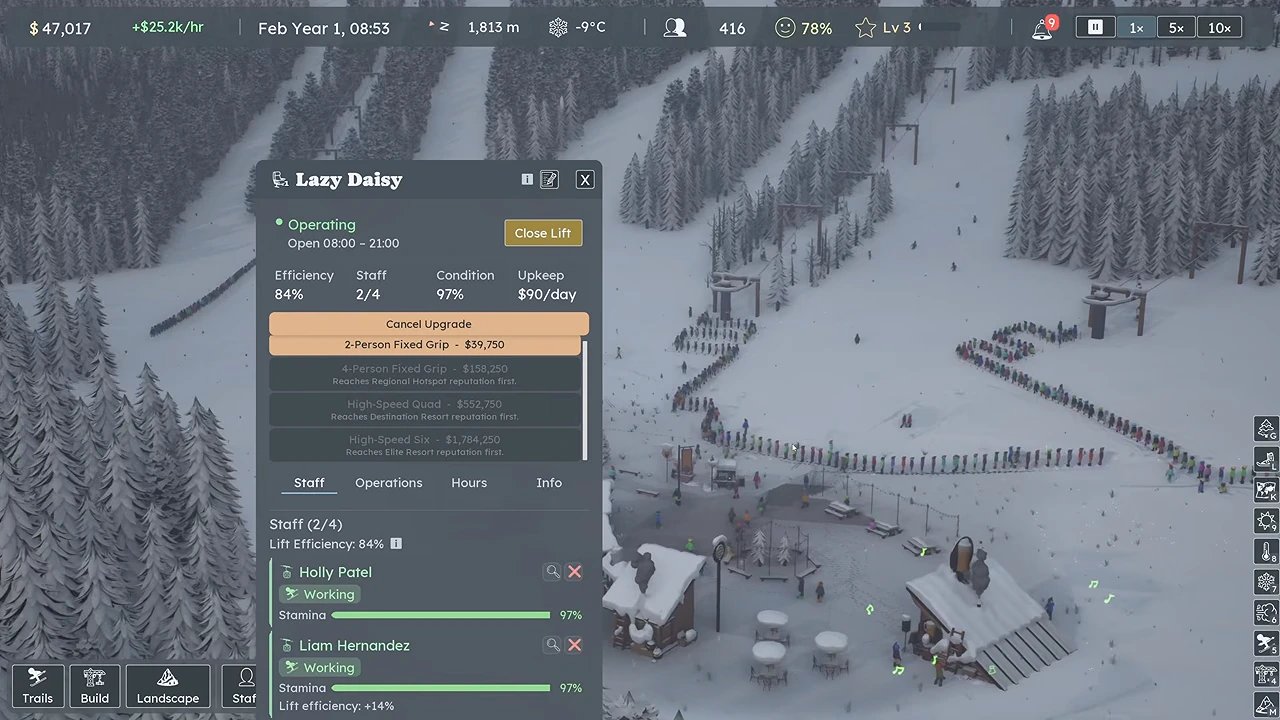
Open the lift’s Upgrade list. If the desired type is locked, open Build → Lifts and check what your reputation has unlocked. If the type is available but the upgrade is still grey, read the station-space note and inspect room around the terminals. Do not spend cash elsewhere under the assumption that money is the only requirement.
 Open full-size image ↗
The public example upgrades a busy single chair to a double. Its price is specific to this lift, not a universal upgrade cost. Nivarias Part 2, 01:02. Grey upgrade checks Check What to do next Not unlocked Use the available type until your reputation unlocks the desired lift. Insufficient station space Read the warning and make room at the affected station before retrying. Insufficient cash Recheck Upcoming bills before saving for or financing the upgrade. None of those explains it Keep the save/build and the exact disabled-control message for a report. Choose an upgrade or a second route based on where people wait
If one small lift is saturated and its route is useful, an unlocked upgrade can be the next investment. If everyone must use the same lower lift to reach every extension, another upper lift can leave that lower bottleneck intact. Consider a separate reachable base lift with suitable runs to spread guests, and include its staff and trail-clearing cost in the decision.
Use price demand as a temporary pressure control
At the ticket office, test a price increase while watching the demand multiplier and finances. The Part 2 example deliberately reduces demand when arrivals exceed capacity. Compare queue complaints and actual riders afterward; do not copy $99/$69 as a guaranteed optimum. Reassess after each capacity change and during different seasonal events.
What success looks like
The chosen lift is reachable and staffed, its efficiency and capacity explain the observed line, and your change increases served riders or reduces excess demand without leaving the next bill unfunded. A neat queue alone is not a capacity increase.
If it does not work
If queues return after an upgrade, check the new arrival level and other lifts feeding the same hub. The public example still reports long queues later despite several upgrades. If a grey option has no unlock, space or cash explanation, preserve the disabled state and build for a bug report rather than repeatedly buying adjacent infrastructure.
Sources and version notes
- Nivarias Part 1: extra lifties and loading efficiency ↗
Sponsored public full-game footage; exact build not shown. Not our own playtest.
- Nivarias Part 2: first lift upgrade and continuing queue pressure ↗
Sponsored public full-game footage; exact build not shown. Not our own playtest.
- Steam community: upgrade unlocks, space, speed and lifties ↗
- Official CL7351 / capacity readouts patch notes ↗
- Official CL6750 patch notes ↗
- Official CL6119 patch notes ↗