Task guide / PC Early Access · November 2026
How to read cash flow, set prices and plan for the next season
Before buying another lift, open Resort Management → Overview and compare your cash with Upcoming payments. Separate wages, maintenance, loan interest and loan payoff. Then use ticket demand and monthly results to judge a price change. Positive hourly income and happy guests do not guarantee enough cash for the next bill.
Updated 2026-11-13 · PC Early Access · November 2026
Follow these steps
Read the bill you will actually have to pay
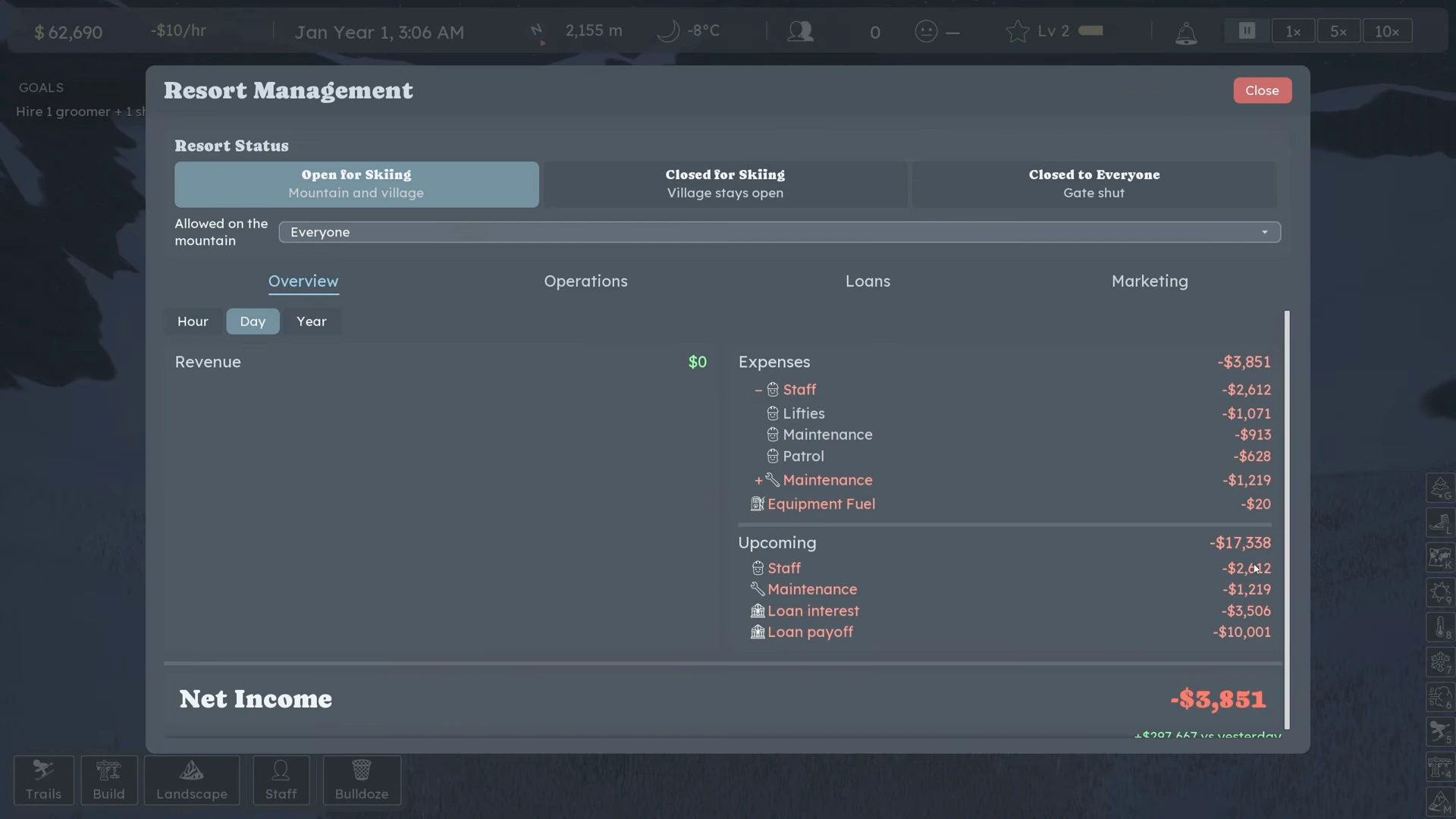
Open Resort Management → Overview and inspect the current day and Upcoming forecast. Read the categories rather than treating the whole total as wages. In the prelaunch beta example below, $17,338 upcoming includes $10,001 loan payoff and $3,506 interest, plus $2,612 staff and $1,219 maintenance. This is a worked example of reading the panel, not a recommended reserve for your current resort.
 Open full-size image ↗
Prelaunch beta sample: the $17,338 bill is mostly debt, not wages. SizzlingPopcorn, 01:55; do not copy these numbers as a current budget. Different money readouts answer different questions Readout Use it to decide Cash balance How much you can spend or pay now. Upcoming payments Which imminent obligations need cash; expand the categories. Revenue How much came in over the selected period. Expenses / net income What went out and the resulting profit or loss over that period. Loan payoff and interest Debt commitments that may dominate a bill even while guests are spending. Change prices while watching demand
Select the ticket office and open its ticket price controls. Change one price, then read the demand multiplier and observe arrivals and queue pressure. The default price reads 1.00x demand; higher prices can reduce demand. In Nivarias Part 2, $99 day / $69 half-day produces a displayed demand of 0.8, but that is his resort’s example, not a universal best price. A lift ticket covers the rides; do not budget for a separate charge on each chairlift trip.
Use busy services to test a small price change
Select a crowded food or drink venue and inspect its prices and demand. The public example raises a food item from $7 to $8 when the line is already long. Recheck demand and the queue afterward; a higher price with too few buyers can be a poor trade. Compare results with a similar operating period, remembering that weather and seasonal events also change arrivals.
Check the full cost before adding capacity
Price the lift, required trail/tree clearing and additional staff, then compare the remaining cash with Upcoming. A new lift can reduce a queue while also adding maintenance and wages. If the purchase leaves the next bill unfunded, pause the expansion and observe operations first. In the beta failure sample, building another lift left only $2,524 even though a much larger payment had already been forecast.
Separate investment from the operating trend
Read the month-end summary. A month with major construction can show a loss even when ticket and service income are improving. Conversely, a strong revenue total does not show that debt is affordable. Track whether repeat costs are covered before repeating the same investment. Do not attribute the entire improvement in a multi-change video to one ticket price or one night-skiing switch.
Carry the cash check into the off-season
When snow is gone, use the resort opening controls to close skiing while leaving Village Only open, or close completely if that suits your plan. Skipping ahead advances time; it does not erase wages and maintenance. Read Upcoming again before and after each change and preserve money for your own visible obligations. This guide does not provide a fixed reserve, a profitable summer build or a guaranteed bankruptcy rescue.
What success looks like
You can identify the next payment categories, explain the difference between cash and period profit, and see how your price change affects demand before committing to another expansion.
If it does not work
If money is disappearing despite good happiness or revenue, reopen Upcoming and the monthly expense breakdown. Check debt payments and recent construction first. If already bankrupt, Load Save is a visible option, but a successful rescue is not demonstrated by the cited failure video. Use an earlier save only if you choose to replay its decisions; no save recovery or price here guarantees solvency.
Sources and version notes
- Nivarias Part 2: ticket and service price changes ↗
Sponsored public full-game footage; exact build not shown. Not our own playtest.
- SizzlingPopcorn: Upcoming payments and later bankruptcy ↗
Recorded in prelaunch beta; historical accounting example, not current solvency proof.
- Official CL6683 patch notes ↗
- Official CL6119 patch notes ↗
- Steam community: Village Only and ongoing summer costs ↗