Task guide / PC Early Access · November 2026
How to fix food, warmth and crowded service needs
Select unhappy guests or read the month’s complaints to identify the missing need. Add a reachable service for that need, then check its crowding and access. More food stalls will not solve a crowded warming hut, and a new venue behind a disconnected hub will not help the guests waiting at your base.
Updated 2026-11-13 · PC Early Access · November 2026
Follow these steps
Identify the need and its location
Inspect an unhappy guest and the complaint summary. Separate hunger, drink, warmth/rest and shopping instead of building the newest unlocked item. Note where the affected guests are and whether the service is missing, unreachable or full. Official rules tie venue complaints to things you have unlocked, so use what your build menu currently offers.
Meet the first food and warmth needs
Open Build and choose an affordable food/drink service plus a Warming Hut where arrivals and returning skiers can reach them. The Warming Hut also appears under Food & Drink. In the starting example, waffles, hot cocoa and warming huts serve the first visitors; the exact collection is a starting sample, not a mandatory build order.
Add capacity for the specific queue
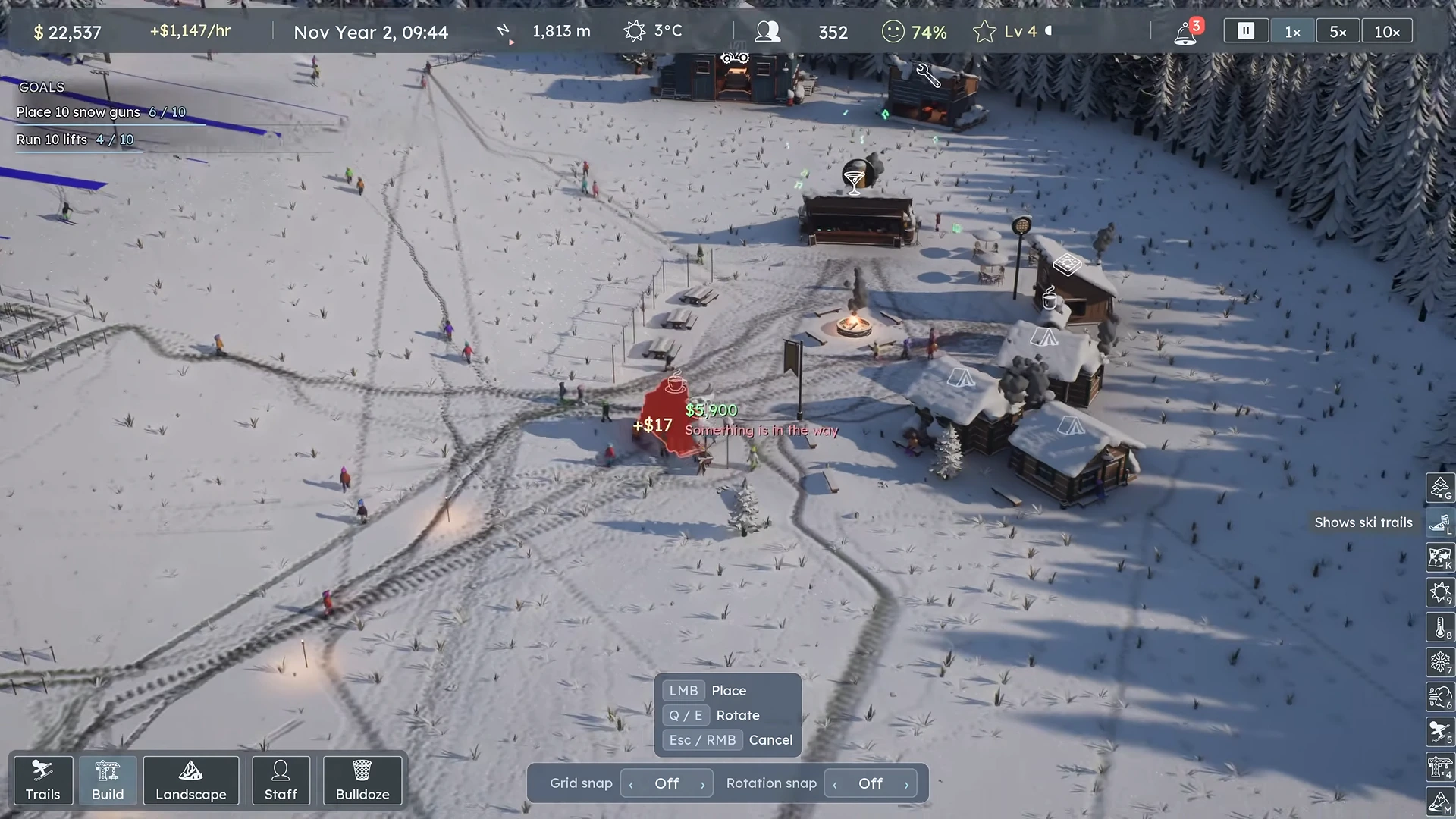
Select the crowded venue and inspect its capacity or waiting crowd. When warming spots are too crowded, add reachable warming capacity; when lunch guests cannot get food, add an appropriate food service nearby. Part 2 adds a burger truck after food complaints. If a placement preview is red and says Something is in the way, move it clear of neighboring objects before confirming. A pub is a later service with its own cost and capacity, not a substitute for every unmet need.
 Open full-size image ↗
This red preview says Something is in the way: move it clear before confirming. Nivarias Part 2, 17:49; exact build not shown. Keep doors and waiting space off the main route
Paint paths linking services and the base, face entrances toward reachable space, and leave room for queues. Do not pack every shop immediately against the main path or lift entrance. The public village rearrangement moves larger venues back and spreads food options so their crowds have somewhere to stand. Check the actual entrance after moving a building rather than judging only its roof.
Test prices and hours after access works
Once the service is reachable and used, read its price and demand controls. A busy line may justify testing a small increase, as the Part 2 food example does; observe demand afterward. For an evening resort, check the venue’s own hours as well as the lit runs. A shop staying open does not by itself keep the ski lifts operating.
Follow the affected guest again
Advance time through the need period—lunch for food, cold conditions for warming—and see whether guests enter and use the intended venue. Recheck the complaint mix and the new venue’s crowding. Expand the service that remains constrained rather than repeating an unrelated building.
What success looks like
Guests with the target need can reach and use the service, its door and queue remain accessible, and the relevant shortage or crowding complaint improves during the period you were trying to serve.
If it does not work
If a new service stays empty, check its hub connection, entrance, hours and the actual unmet need. If guests still complain while the venue is full, add capacity or spread an equivalent service where those guests can reach it. Moving a building now walks guests out in CL7794; old ghost-customer counts do not establish current demand.
Sources and version notes
- Nivarias Part 1: basic food, drink, warmth and growing crowding ↗
Sponsored public full-game footage; exact build not shown. Not our own playtest.
- Nivarias Part 2: food shortage and village services ↗
Sponsored public full-game footage; exact build not shown. Not our own playtest.
- Nivarias Part 2: move venues and leave queue room ↗
Sponsored public full-game footage; exact build not shown. Not our own playtest.
- Official CL6797 patch notes ↗
- Official CL6683 patch notes ↗
- Official CL7794 patch notes ↗